Preface
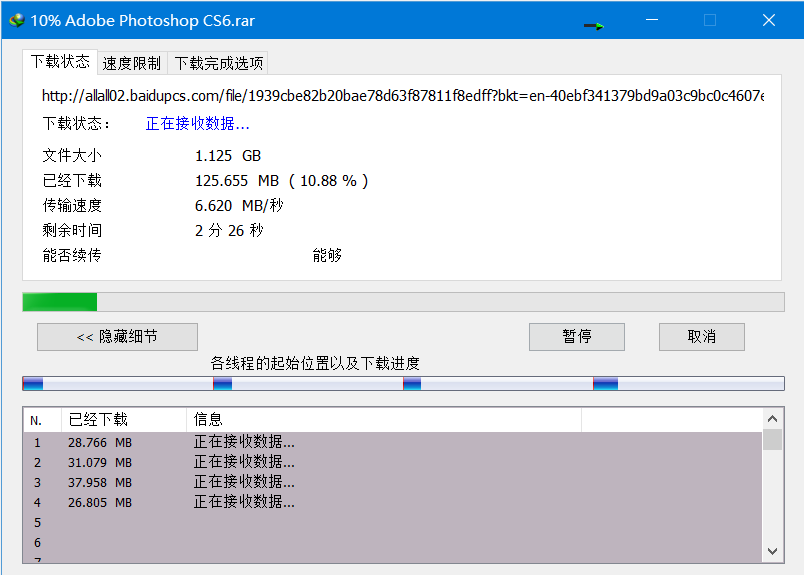
Baidu Netdisk's speed limits have always been a nuisance. As a student I really can't afford the expensive renewal fee — ¥30 per month or over ¥260 per year — and I don't use it much. Yesterday I was downloading a 6GB software package that was throttled to 100 KB/s, which was really frustrating, so I found a method to obtain the direct link. On my campus network with a 100 Mbps connection I personally reached up to 8 MB/s.
What you need
- Microsoft Edge browser
- IDM (there are many cracked versions online)
- tampermonkey Installation method: Detailed tutorial on how to install tampermonkey on Edge
- Baidu Netdisk Simple Download plugin Download link: 百度网盘简易下载助手(直链下载复活版)下载地址
If you need to convert an Edge extension to a Chrome extension, I recommend reading an article by 威言威言: Chrome浏览器安装Edge浏览器的扩展插件
Getting started
1:First install the tampermonkey userscript manager; the installation method is linked above.
2:Then open the Baidu Netdisk Simple Download Assistant URL in Edge and install the plugin/script. Then enable the direct-link plugin.
3:Download IDM. If you don't have IDM, I suggest checking the 吾爱论坛 where there are many versions. Of course you can also choose to purchase a one-year license — I bought an official one for ¥22/year, which is quite affordable.
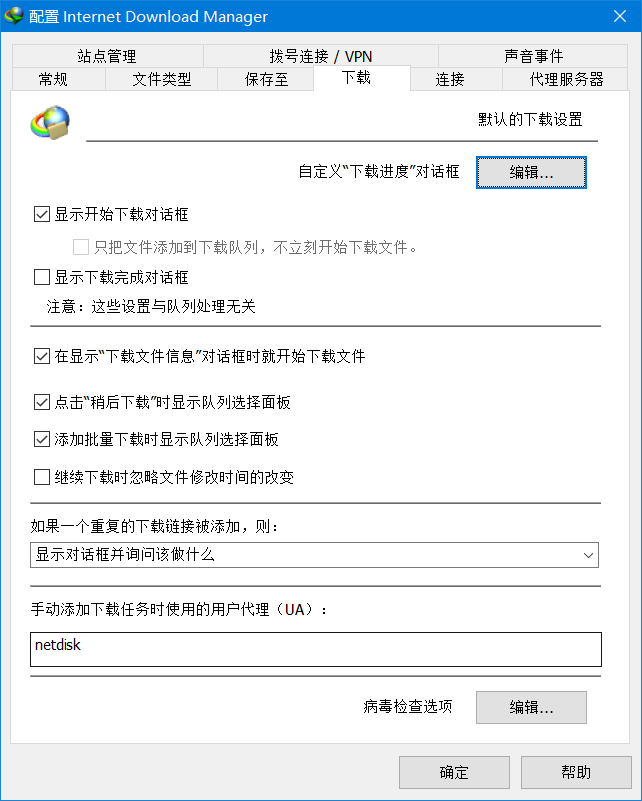
4:Set IDM-related properties as follows:
- Options -> Downloads -> When manually adding a download task, set the User Agent (UA) to: netdisk.
- Options -> Connections -> Default max number of connections (change to 4 threads)
- After setting, click OK to save.
https://img.yuano.cc/upload/idm1.png
5:Open Baidu Netdisk, first check the files you want to download, click the Simple Download Assistant above, and then get the direct link.

https://img.yuano.cc/upload/zhilian11.png
6:Paste the obtained direct link into IDM to create a new download task — that's it.
https://img.yuano.cc/upload/jiasu6.png